

Toby vs Tabsurfer: Which is Better?
I compared Toby and Tabsurfer to see which tab manager reduces clutter, saves memory, and keeps daily browsing more organized.

Dudu
Dec 28, 2025
Last Updated Dec 28, 2025
Image Credit: Toolfolio
Browser tabs pile up fast. One project turns into ten tabs. A quick search becomes twenty. Before long, the browser feels messy, slow, and impossible to navigate. Closing everything means losing context. Keeping everything open means chaos.
Tab managers promise a way out. Toby and Tabsurfer both aim to organize tabs, cut through clutter, and help people work better. But they work differently. Toby focuses on visual collections and workspace organization. Tabsurfer emphasizes speed, memory savings, and collapsing sessions out of sight.
I tested both tools to see how they handle real browsing habits. This comparison covers what each tool does, how they differ in features and pricing, and which one fits different workflows.
By the end, you will know which tab manager matches how you actually use your browser.
What is Toby
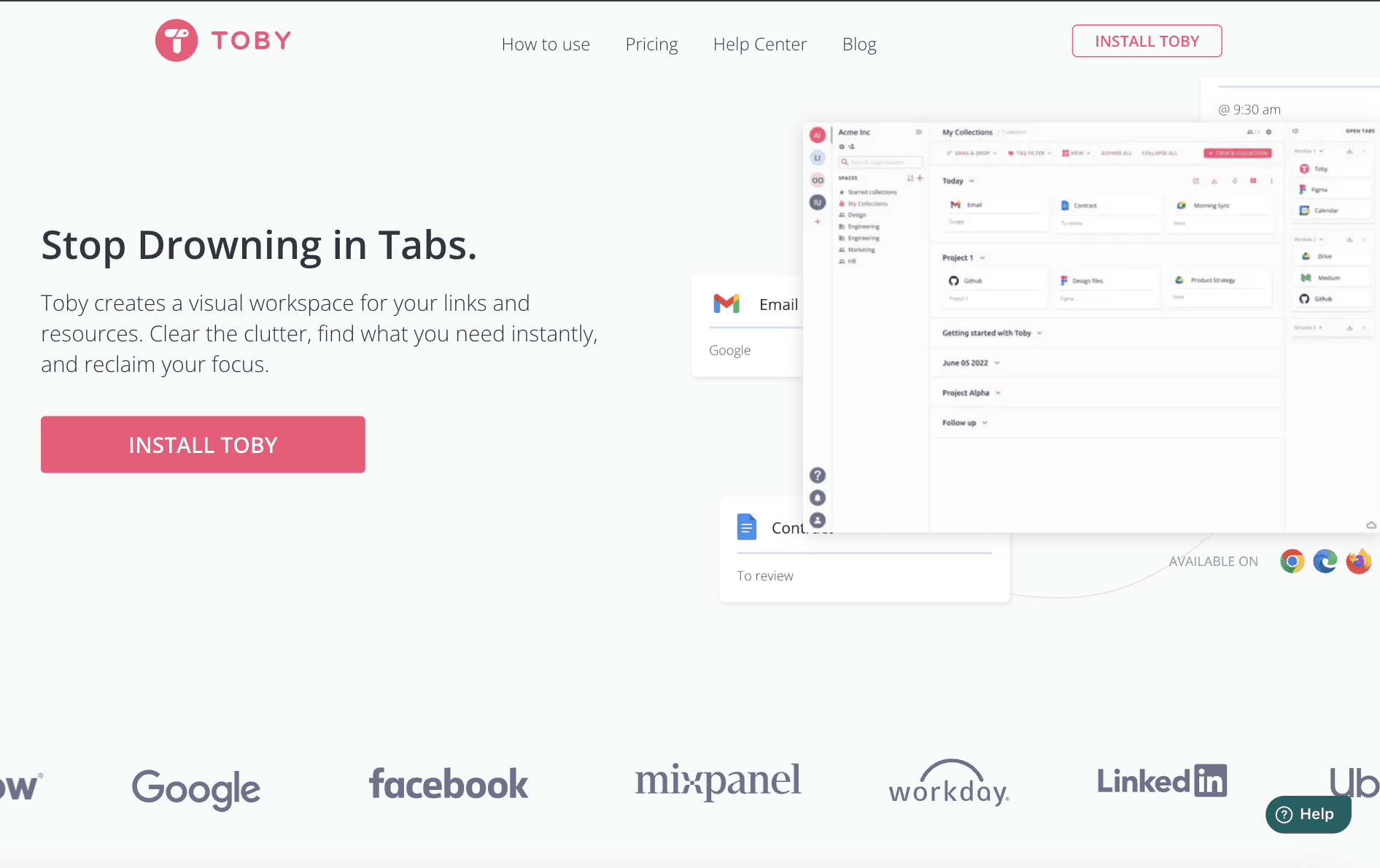
Toby is a tab manager that replaces messy browser windows with clean visual boards. Instead of keeping dozens of tabs open, you save links into organized collections and return to them when needed. It works like a simple workspace where every project has its own place, and nothing gets lost inside the browser.
You install the Toby extension and open a new tab to start using it. Your browser becomes a dashboard that shows saved tabs as cards. You can group links into collections, and those collections sit inside workspaces called Spaces.
This structure makes it easy to separate personal research, client work, and ongoing projects without jumping between windows.
Toby also supports collaboration. You can share Spaces with your team so everyone has access to the same links and documents. This helps when resources usually get buried in chats and long email threads.
What is Tabsurfer

Tabsurfer is a tab manager built for people who keep many tabs open at the same time. Instead of saving everything into boards, it focuses on managing active sessions, reducing memory usage, and keeping your browser fast.
You install the extension and can collapse all open tabs with one click, which clears your browser without losing your work. When you need those tabs again, you reopen everything instantly.
Tabsurfer includes features that support daily browsing. You can organize tabs into folders, pin important pages, add tags for quick filtering, and search through all tabs by title or URL. If you work in routines, you can set schedules that open selected tabs at specific times, such as your morning research set or daily dashboards. Sharing also works well. You can turn multiple tabs into a single link or send content to AI to get summaries and answers.
Tabsurfer aims to stay simple and fast. Most core features are free, and the paid plan unlocks unlimited folders, tags, and shareable links, along with AI features and notes. It fits users who want to manage active tabs, reduce clutter in the moment, and move through their browser with less friction.
Toby vs Tabsurfer: Which is Better?
Now that we understand what both tools do, let's compare them directly.
Pricing and Value
Toby and Tabsurfer take completely different approaches to pricing.
Toby uses a subscription model with three tiers.
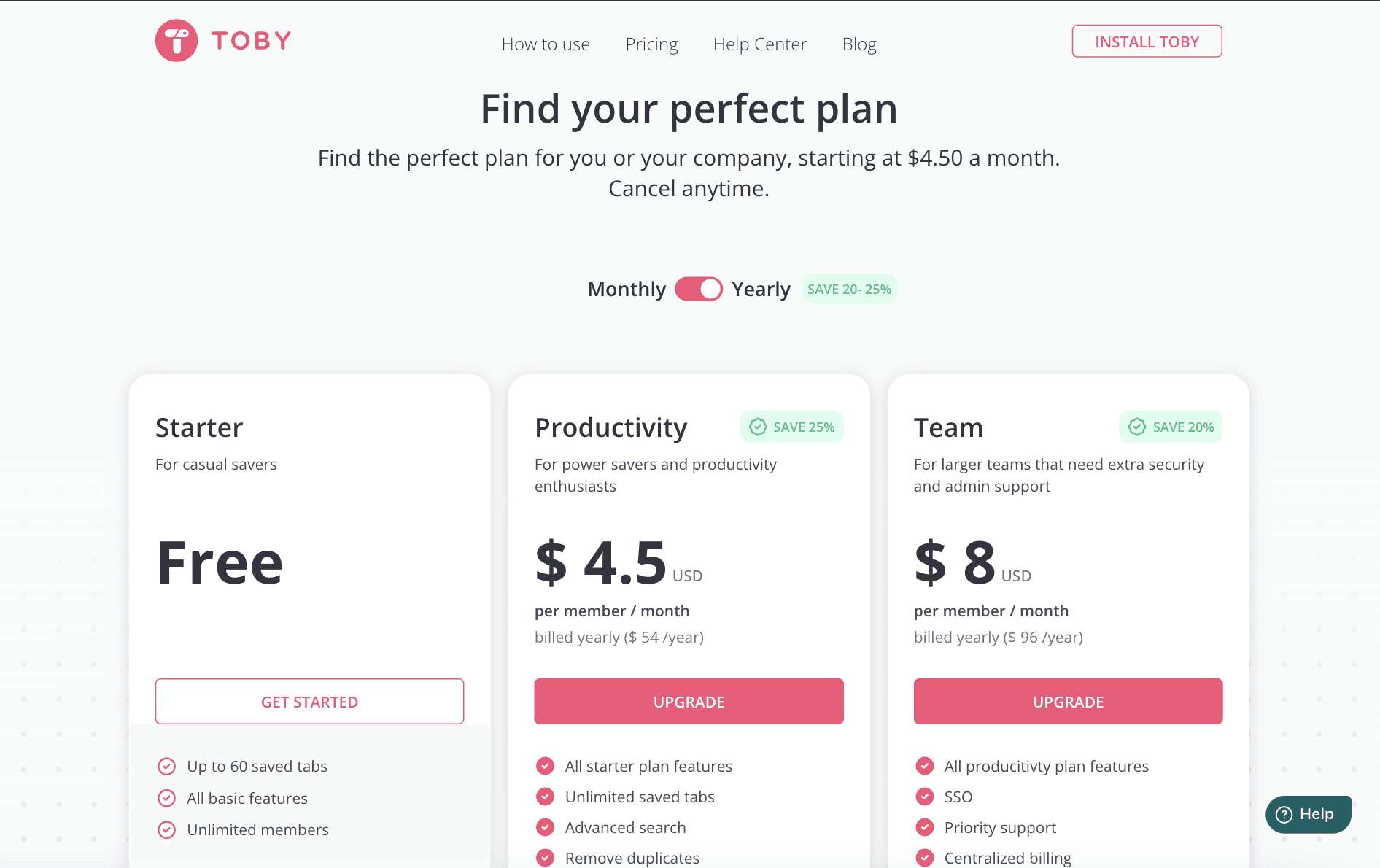
The Starter plan is free but limits you to 60 saved tabs. For most people who deal with tab overload, 60 tabs fills up fast. Once you hit that limit, you need to upgrade.
The Productivity plan costs $4.50 per month when billed yearly, which comes out to $54 per year. This plan removes the tab limit and adds advanced search plus duplicate removal.
The Team plan costs $8 per month per user when billed yearly, totaling $96 per year per person. It adds single sign-on, priority support, and centralized billing for larger organizations.
Tabsurfer offers a simpler structure.
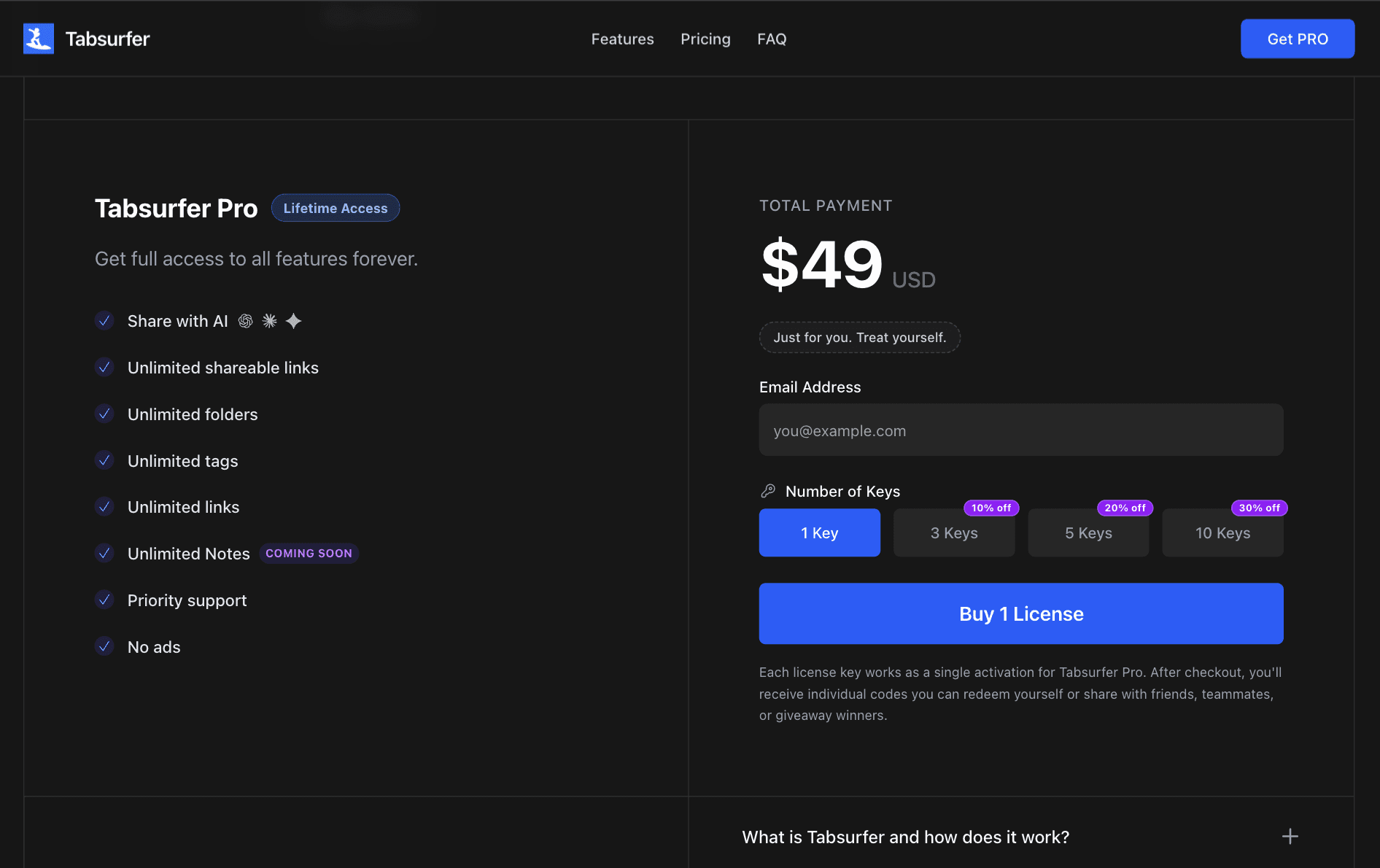
The free version includes core features like collapsing sessions, instant search, keyboard shortcuts, schedules, and two folders. You get one free shareable link and one free tag to try the pro features.
The Pro plan costs $49 as a one-time payment. You pay once and own it forever. Pro unlocks unlimited shareable links, unlimited folders, unlimited tags, AI summaries, priority support, and removes ads. When quick notes launch, Pro users get those too.
After just over a year, Toby's Productivity plan costs more than Tabsurfer's lifetime access. After two years, you've paid $108 for Toby while Tabsurfer still costs $49 total. After five years, Toby costs $270 compared to Tabsurfer's single $49 payment.
Tabsurfer wins on pricing. For individuals and small teams who want to pay once and move on, Tabsurfer offers significantly better value.
Core Features and Functionality
Both tools organize tabs, but they handle the job differently.
Toby focuses on visual organization. When you save tabs, they appear as cards with titles and favicons arranged in collections.

Collections sit inside spaces, and spaces group related work together. You might have a space for each client or project, with collections for research, documents, and inspiration.
The visual approach works well when you want to see everything. You scan your collections, spot what you need, and click to open. Toby also lets you add notes to collections, tag items for filtering, and search through saved tabs.
You can share collections with teammates, making it easier for groups to access the same resources.
The tool supports collaboration directly, which matters for teams working on shared projects.
Tabsurfer takes a different approach. Instead of replacing your new tab page, Tabsurfer works as a side panel or extension popup.

You collapse your current tabs into a session, which clears your tab bar and saves everything in the background. Those tabs disappear from view but remain accessible through the Tabsurfer interface. When you need them again, you restore the session or open specific tabs individually.
Tabsurfer emphasizes speed and memory savings. Collapsing tabs frees up system resources immediately. Your browser runs faster because it's not keeping dozens of tabs active in memory.
The AI feature in Tabsurfer Pro adds another dimension. You can send tab content directly to AI for summaries, analysis, or answers without leaving your browser.
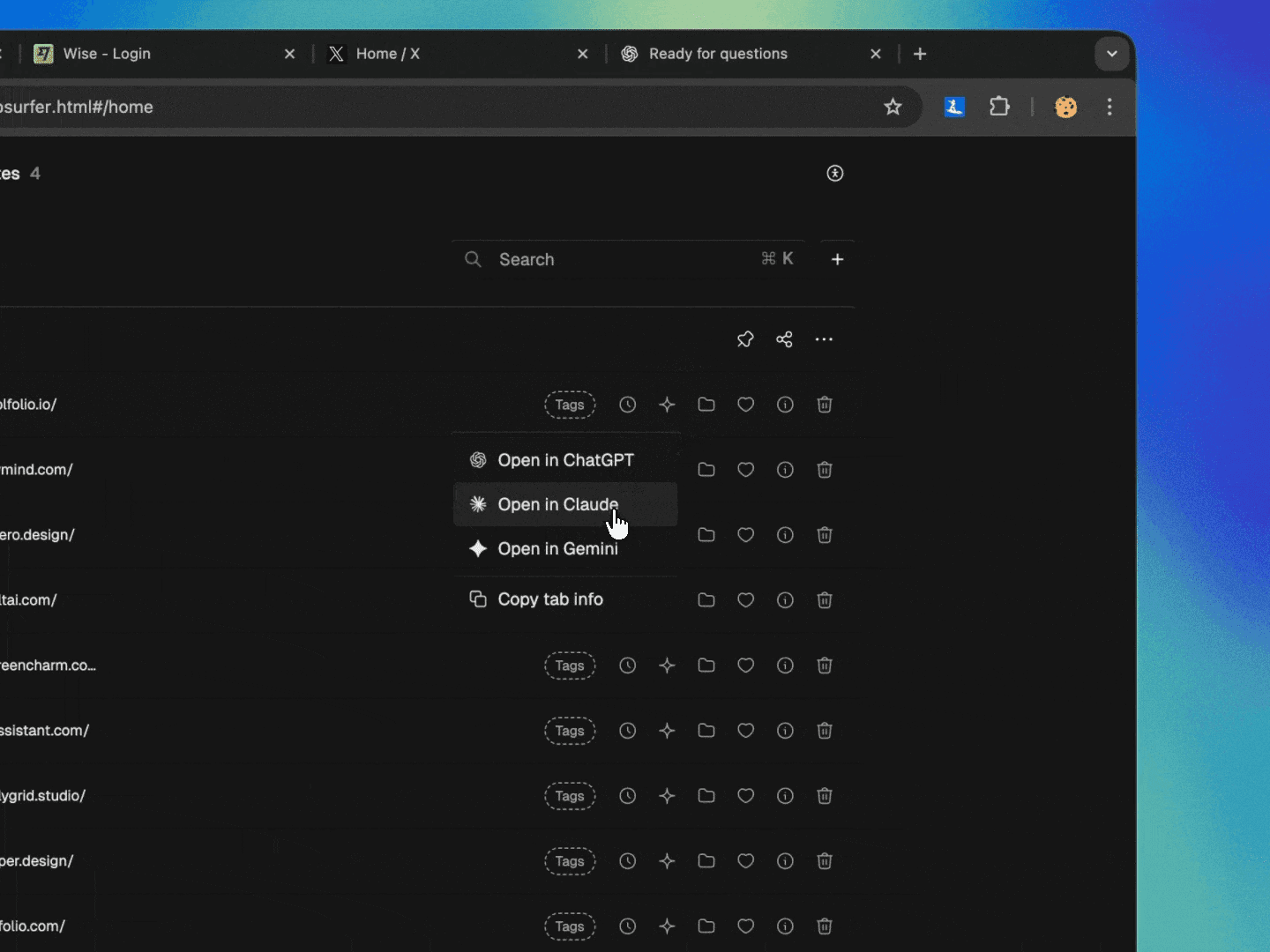
This works well for research, reading long articles, or extracting key points from documentation. Toby mentions AI coming soon, but Tabsurfer ships with it now.
Shareable links in Tabsurfer let you bundle multiple tabs into one URL.
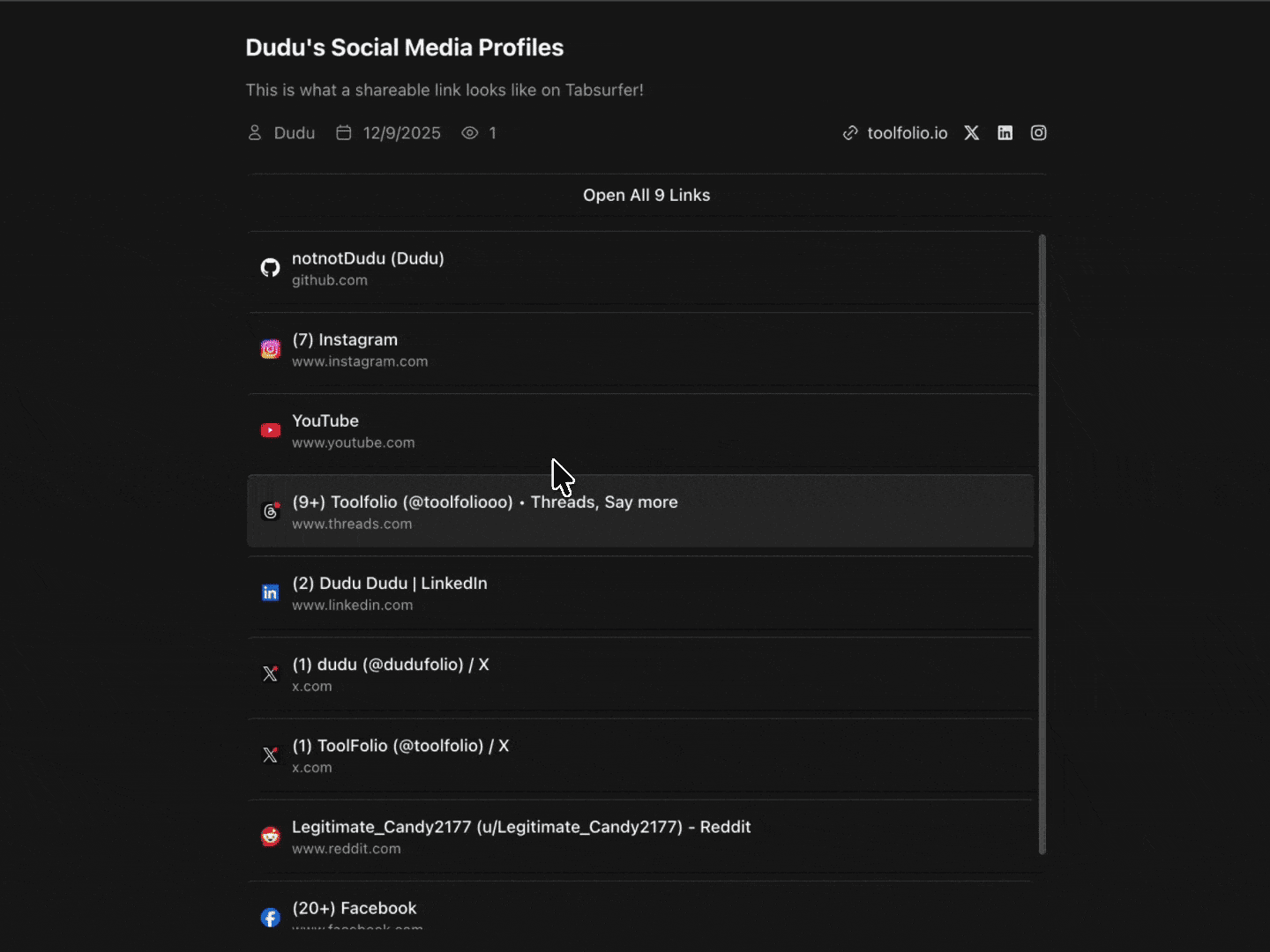
Instead of sending five different links to a teammate, you create one shareable link that opens all five tabs at once.
Tabsurfer gives you more practical features for daily browsing. The free version covers basic needs with schedules, instant search, and shortcuts. The Pro version adds AI, unlimited organization tools, and shareable links.
Toby offers a cleaner visual experience and native collaboration features, but limits free users to 60 tabs and lacks some of the workflow automation Tabsurfer includes.
AI and Advanced Features
AI features distinguish modern tools from basic ones, and Tabsurfer includes AI while Toby doesn't yet.
Tabsurfer Pro lets you send tab content directly to AI. This means you can ask questions about an article, request a summary of a long document, or extract key points from a research paper without leaving your browser.

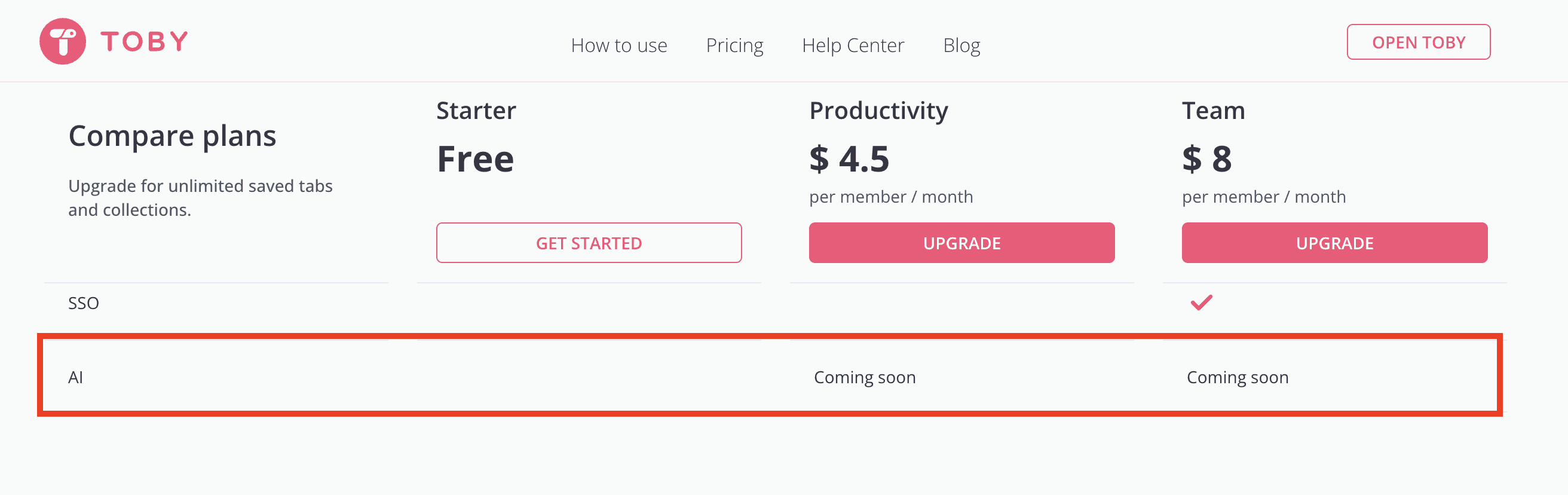
Toby lists AI as "coming soon" on their pricing page. They plan to add it eventually, but it's not available now. If AI assistance matters to your workflow today, Tabsurfer offers it while Toby doesn't.
Tabsurfer also includes schedules, which automate your tab management. You can set specific tabs to open automatically at certain times or days.

If you start every Monday morning with the same five work tabs, you schedule them to open at 9am on Mondays. This small automation saves time and mental energy. You don't think about what you need to open because it happens automatically.
Toby doesn't include scheduling. You can save sessions and reopen them manually, but there's no automation. For people with consistent routines, this means extra clicks every day.
Toby vs Tabsurfer Comparison
Feature | Toby | Tabsurfer |
|---|---|---|
Free Plan Limits | 60 tabs maximum | Unlimited tabs, 2 folders, 1 tag |
Paid Plan Cost | $54/year (Productivity) | $49 lifetime (Pro) |
Memory Management | Indirect (close tabs manually) | Active (collapse sessions) |
AI Features | Coming soon | Available now in Pro |
Scheduling | Not available | Auto-open tabs at set times |
Shareable Links | Requires shared workspace | One URL opens multiple tabs |
Visual Interface | Card-based, replaces new tab | List-based, side panel/popup |
Keyboard Shortcuts | Basic | Extensive throughout |
Collaboration | Native team features | Shareable links, flexible |
Search | Available, advanced in paid plans | Instant search in free plan |
Best For | Visual organization, team workspaces | Speed, memory savings, automation |
Wrapping Up: The Verdict
Tabsurfer is the better choice for most people. The lifetime pricing alone makes it more affordable than Toby's subscription model, but the advantages go deeper than cost. Tabsurfer includes AI features that Toby only promises for the future.
It actively manages memory to make your browser faster, schedules automate repetitive tasks, and shareable links make collaboration simple without forcing everyone onto the same platform.
Toby excels at visual organization and native team collaboration. If you work with a team that needs shared access to the same collections and you value seeing everything laid out visually, Toby might fit better.
But for individuals, small teams, and anyone who prioritizes value, speed, and practical features, Tabsurfer delivers more for less.
You May Also Like












Featured Tools








Newest Additions





















AI Image & Video Generation

































Vibe Coding Library



























































Screenshot & Screen Recording Tools
















